
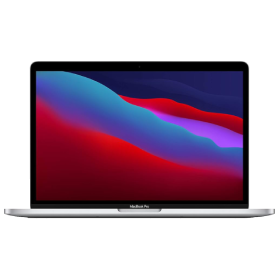
MacBook Pro 13 Inch M1 (2020)
Price range: € 617,10 through € 637,10 incl. VAT, private-copy levy and shipping
2-year warranty incl. battery · Keurmerk Refurbished certified · Price incl. VAT, private-copy levy and shipping · Next-business-day delivery via PostNL
Eco vouchers
You can pay for this device with your Pluxee (Sodexo) and Monizze eco vouchers. Refurbished devices are among the permitted purchases. How does that work?
The 13-inch MacBook Pro with M1 from November 2020 runs on Apple’s own chip rather than Intel, unlike its predecessor. You notice it most in battery life: up to 17 hours of wireless web browsing and up to 20 hours of film playback in the Apple TV app, where the Intel model managed up to 10 hours. The M1 has 8 CPU cores, 8 GPU cores and a 16-core Neural Engine, so it runs macOS 27 and supports Apple Intelligence, including in Dutch and French.
The 13.3-inch Retina display reaches 500 nits with P3 colour and True Tone. You type on the backlit Magic Keyboard (AZERTY) with Touch Bar and unlock with Touch ID. Green-ware supplies this refurbished MacBook Pro with certified data erasure and a 2-year warranty, battery included.
Pick your storage, colour and condition in the menu next to the photo.
Who is the MacBook Pro 13 Inch M1 (2020) for?
- You study or work from home and want a laptop that lasts a full working day away from a socket.
- You want Apple Intelligence and macOS 27 without paying for a new Mac.
- You mainly use Office, the web, photos and light video editing.
- One external display is enough for you, as the M1 supports one.
MacBook Pro M1 or the 2020 Intel model?
- Apple M1 instead of a 10th-generation Intel Core i5.
- Battery: up to 17 hours of browsing and 20 hours of video, versus up to 10 hours.
- Two Thunderbolt / USB 4 ports instead of four Thunderbolt 3 ports.
- The Intel model cannot run macOS 27; the M1 can. Both have the Touch Bar, Touch ID and Magic Keyboard.
MacBook Pro M1 or MacBook Pro M2 (2022)?
- The M2 has a 10-core GPU; the M1 an 8-core GPU.
- The M2 goes up to 24 GB of memory; the M1 up to 16 GB.
- Otherwise the same enclosure, display, ports, Touch Bar and battery claims (17/20 hours).
The MacBook Pro 13 Inch M1 (2020) next to its neighbours
| MacBook Pro 13 M1 (2020) | |
|---|---|
| Chip | Apple M1 (8-core CPU, 8-core GPU, 16-core Neural Engine) |
| Memory | 8 or 16 GB (not upgradable) |
| Display | 13.3-inch Retina (IPS), 2560 x 1600, 500 nits, P3, True Tone |
| Ports | 2x Thunderbolt / USB 4, headphone jack |
| External displays | 1, up to 6K at 60 Hz |
| Battery | up to 17 hours browsing, up to 20 hours video |
| Keyboard | backlit Magic Keyboard with Touch Bar and Touch ID |
| Software | macOS 27, with Apple Intelligence |
Software updates
The M1 MacBook Pro launched with macOS Big Sur (11) and now runs macOS 27. Apple Intelligence is supported, including in Dutch and French. Apple does not announce an end date. However, the M1 is the oldest chip on the macOS 27 list, so there is a real chance a future version will drop it. Previous macOS versions have historically received around 2 more years of security updates, but that is an expectation, not a guarantee.
Condition
- A – Like new: no or hardly any visible signs of use, scratch-free screen.
- B – Lightly used: light signs of use on the casing, screen in good condition.
- C – Visibly used: clear signs of use, technically fully working.
Honest price, no surprises: the price shown includes VAT, the private-copy levy and shipping. Nothing is added at checkout; only paying by credit card or with eco vouchers adds the surcharge of the payment provider. Ordered before 4 pm on a business day? PostNL delivers the next business day.
Specifications
| Year introduced | 2020 |
|---|---|
| Chip | Apple M1: 8-core CPU (4 performance + 4 efficiency), 8-core GPU, 16-core Neural Engine |
| Memory | 8 GB or 16 GB unified memory, not upgradable |
| Storage | 256 GB, 512 GB, 1 TB or 2 TB SSD |
| Display | 13.3-inch Retina, LED-backlit IPS, 2560 x 1600 pixels (227 ppi), 500 nits, P3, True Tone |
| Ports | 2x Thunderbolt / USB 4 (charging, DisplayPort, up to 40 Gb/s), 3.5 mm headphone jack |
| External display | 1 display up to 6K at 60 Hz |
| Battery | 58.2 Wh; up to 17 hours wireless web, up to 20 hours film playback in the Apple TV app |
| Keyboard | AZERTY, backlit Magic Keyboard (scissor mechanism) with Touch Bar and Touch ID |
| Camera and audio | 720p FaceTime HD camera, stereo speakers with Dolby Atmos playback, 3 microphones |
| Dimensions and weight | 1.56 x 30.41 x 21.24 cm; 1.4 kg |
| Software | macOS Big Sur (11) at launch, now macOS 27 |
Frequently asked questions
How long will the M1 MacBook Pro get updates?
It runs macOS 27. As the M1 is the oldest chip on that list, a future version may drop it; Apple has announced nothing. In the past, around 2 years of security updates usually followed.
Does Apple Intelligence work?
Yes. Apple Intelligence works on Macs with M1 or later, including in Dutch and French. Some of the newest features may have higher requirements.
Is 8 GB of memory enough?
For Office, browsing, photos and light video, yes. For heavy professional workloads 8 GB is tight, and the memory cannot be upgraded later.
How many external displays can I connect?
One external display, up to 6K at 60 Hz, through one of the Thunderbolt / USB 4 ports.
Is the battery in good condition?
At Green-ware the battery has at least 85% of its original capacity. Apple rates it at up to 17 hours of browsing. If it drops below 70% within the 2-year warranty, we replace it free of charge.
Can I pay with eco vouchers?
Yes, with Pluxee and Monizze eco vouchers for the MacBook. Accessories are excluded.
| Condition | A – Like new, B – Lightly used |
|---|---|
| Storage | 256GB |
| Colour | Silver |
| Processor | 3.2GHz |
| RAM | 8GB |
| Keyboard | AZERTY |
Only logged in customers who have purchased this product may leave a review.
Reviews
There are no reviews yet.